









Crazy Games Unblocked
  • Action
  • Adventure
  • Arcade
  • Basketball
  • Blog
  • LOGIN
  • FoosballPLAY NOW!
    Foosball
    0 votes, average: 0.00 out of 50 votes, average: 0.00 out of 50 votes, average: 0.00 out of 50 votes, average: 0.00 out of 50 votes, average: 0.00 out of 5
    4
  • Rooftop SnipersPLAY NOW!
    Rooftop Snipers
    0 votes, average: 0.00 out of 50 votes, average: 0.00 out of 50 votes, average: 0.00 out of 50 votes, average: 0.00 out of 50 votes, average: 0.00 out of 5
    17
  • Soccer RandomPLAY NOW!
    Soccer Random
    0 votes, average: 0.00 out of 50 votes, average: 0.00 out of 50 votes, average: 0.00 out of 50 votes, average: 0.00 out of 50 votes, average: 0.00 out of 5
    12
  • Wrestle BrosPLAY NOW!
    Wrestle Bros
    0 votes, average: 0.00 out of 50 votes, average: 0.00 out of 50 votes, average: 0.00 out of 50 votes, average: 0.00 out of 50 votes, average: 0.00 out of 5
    6
  • Backgammon OnlinePLAY NOW!
    Backgammon Online
    0 votes, average: 0.00 out of 50 votes, average: 0.00 out of 50 votes, average: 0.00 out of 50 votes, average: 0.00 out of 50 votes, average: 0.00 out of 5
    6
  • Ragdoll ArchersPLAY NOW!
    Ragdoll Archers
    0 votes, average: 0.00 out of 50 votes, average: 0.00 out of 50 votes, average: 0.00 out of 50 votes, average: 0.00 out of 50 votes, average: 0.00 out of 5
    18
  • Soccer BrosPLAY NOW!
    Soccer Bros
    0 votes, average: 0.00 out of 50 votes, average: 0.00 out of 50 votes, average: 0.00 out of 50 votes, average: 0.00 out of 50 votes, average: 0.00 out of 5
    8
  • DodgeballPLAY NOW!
    Dodgeball
    0 votes, average: 0.00 out of 50 votes, average: 0.00 out of 50 votes, average: 0.00 out of 50 votes, average: 0.00 out of 50 votes, average: 0.00 out of 5
    6
  • Flappy DunkPLAY NOW!
    Flappy Dunk
    0 votes, average: 0.00 out of 50 votes, average: 0.00 out of 50 votes, average: 0.00 out of 50 votes, average: 0.00 out of 50 votes, average: 0.00 out of 5
    12
  • We Become What We BeholdPLAY NOW!
    We Become What We Behold
    0 votes, average: 0.00 out of 50 votes, average: 0.00 out of 50 votes, average: 0.00 out of 50 votes, average: 0.00 out of 50 votes, average: 0.00 out of 5
    13
NEWS
  • Foosball - Foosball is a digital table-soccer game where rows of fixed players are moved to intercept the ball, create passing lanes...
  • Rooftop Snipers - Rooftop Snipers is a two-button physics shooter where rivals duel on narrow rooftops and try to knock each other off the...
  • Soccer Random - Soccer Random is a pixel-art physics soccer game where one button controls jumping and kicking while fields, balls, players...
  • Wrestle Bros - Wrestle Bros is an arcade wrestling game where exaggerated fighters jump, block, strike and grapple in quick ring battles....
  • Backgammon Online - Backgammon Online is a digital version of classic backgammon where players roll dice, move checkers around the board and...
  • Ragdoll Archers - Ragdoll Archers is a physics-based archery battle game where ragdoll stickmen trade arrows, earn points and improve combat...
  • Soccer Bros - Soccer Bros is a fast 1v1 arcade soccer game built around simple movement, strong shots, tackles and quick scoring chances....
  • Dodgeball - Dodgeball is a water-based sports game that mixes dodgeball with several competitive mini-game modes. The basic goal is to...
  • Flappy Dunk - Flappy Dunk is a one-touch arcade basketball game where each tap lifts a bouncing ball and the goal is to pass cleanly through...
  • We Become What We Behold - We Become What We Behold is a short point-and-click game about news cycles in which the moments you photograph influence...
Home / Blog / How to turn on Dinosaur game and start playing?
How to turn on Dinosaur game and start playing?

Blog lisa 01 Apr , 2026 0

How to turn on Dinosaur game and start playing?

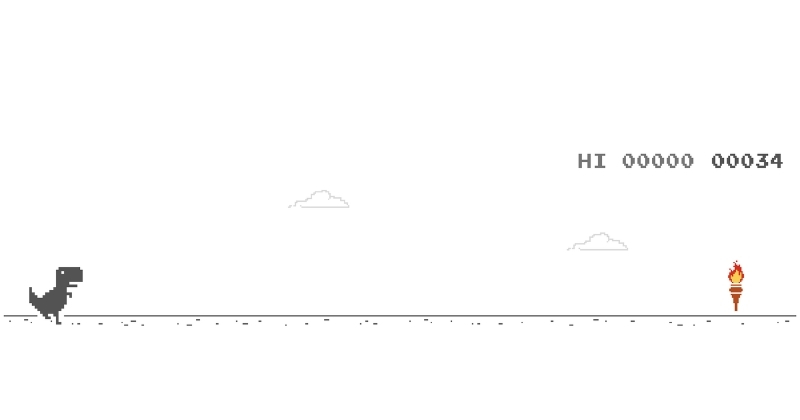
You can turn on the dinosaur game by typing chrome://dino into Chrome and pressing Enter. You can also launch the same game from Chrome’s no-internet screen when your connection drops. Playing it is simple because the controls only use jump and duck on desktop, while mobile only needs taps.

Some school or work devices may block the game because administrators can disable it. The run also does not truly end at 99999, because the score display rolls over instead of unlocking a secret ending. Read the full guide below on Crazy Games Unblocked for a clean no ads game experience and a quick answer to how to turn on dinosaur game.

How to turn on dinosaur game?

You can open dinosaur game by entering chrome://dino in Chrome. That is the fastest way to start the game while you are online.

This method is easy because it skips the need to disconnect your internet. Once the game loads, press Space on desktop or tap the screen on mobile to begin. For most players, that is the full answer to how to turn on dinosaur game.

The shortcut also makes the game feel much less hidden. A lot of people know the dinosaur exists, but they do not realize Chrome lets you open it directly at any time.
How to turn on dinosaur game? 
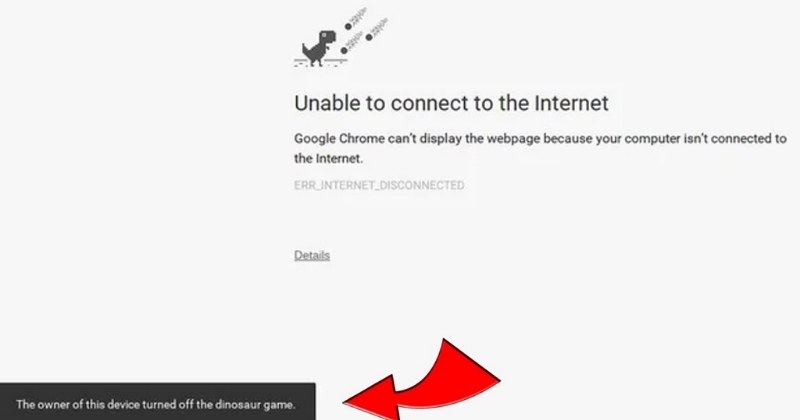
Typing chrome://dino is the fastest way to turn on dinosaur game.

How to activate Google Chrome’s secret dinosaur game

You activate the secret dinosaur game by using Chrome’s built-in shortcut or by opening the offline error page. Both methods lead to the same game.

The direct shortcut is better when you want to play on purpose. The offline page is the classic version that appears when Chrome cannot load a website. Both options work, but the shortcut is much faster if your only goal is how to turn on dinosaur game without waiting for a connection problem.

That is also why the game still feels like a hidden feature. It is easy once you know it, but many players never learn the direct route.

How to play the no internet Google Chrome dinosaur game

You play the no internet Chrome dinosaur game by starting the dinosaur and avoiding obstacles for as long as possible. The rules are simple, but the speed keeps increasing.

The easiest way to understand how to turn on dinosaur game is this:

  • Open the game through chrome://dino or the no-internet page.
  • Press Space or Up Arrow to start on desktop.
  • Jump over cacti.
  • Press Down Arrow to duck under flying enemies.
  • On mobile, tap the screen to jump.

The goal is to survive as long as possible without crashing. That is also why how to turn on dinosaur game stays such a popular search. It is quick to learn, but it stays challenging because the pace keeps rising.

How to play the no internet Google Chrome dinosaur game
You can play it by opening the offline screen and starting the dinosaur.

What are the controls for the dinosaur game?

The controls are jump and duck. On desktop, use Space or Up Arrow to jump and Down Arrow to duck. On mobile, tap the screen to jump.

That is all you really need. The game has almost no control complexity, which is a big part of its appeal. It starts fast and never asks you to learn anything complicated first.

If you searched how to turn on dinosaur game because you also wanted the controls, this is the next thing to remember after opening it.

Can you play the dinosaur game on mobile?

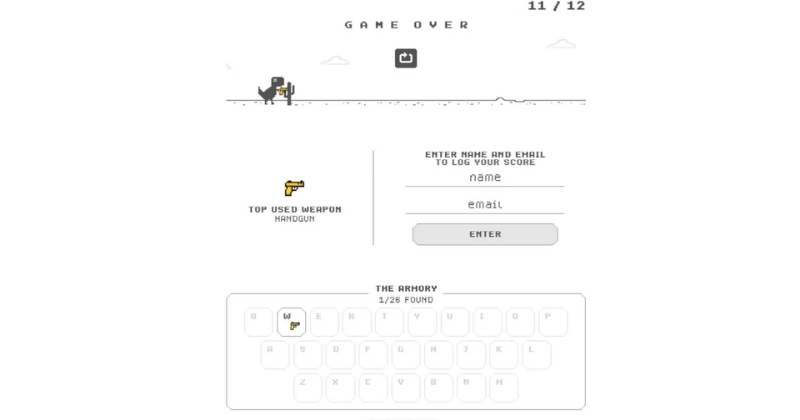
Yes, you can play the dinosaur game on mobile. Open it in Chrome, then tap the screen to start and jump.

The mobile version works almost the same way as the desktop version. The biggest difference is that touch replaces keyboard input. That makes the game very easy to use on a phone.

So if your version of how to turn on dinosaur game means mobile, the answer stays simple. Open the game, tap the screen, and start running.
Can you play the dinosaur game on mobile?
You can play the dinosaur game on mobile.

Why do schools turn off the dinosaur game?

Schools turn off the dinosaur game because managed browsers can disable it. This often happens on school or work devices where administrators control Chrome settings.

That means the game may not open even if you follow the right steps. If chrome://dino does not work on a school Chromebook, the problem may be the device policy rather than your method. This is why some students can open the game at home but not in class.

So if how to turn on dinosaur game does not work on a managed device, the feature may simply be blocked.

What happens after 99999 in Chrome dinosaur game?

The visible score rolls over after 99999. The game keeps running, but the display resets instead of showing a larger number in the normal way.

For most players, this is more of a fun fact than a practical milestone. Reaching that score takes a long time, and the speed becomes very hard to manage before then. That is also why players who first search how to turn on dinosaur game often end up looking for score-related questions later.

It does not. The run continues, but the visible score loops.

Why is the dinosaur game still popular?

The dinosaur game is still popular because it is fast, simple, and built right into Chrome. You can start it in seconds and understand it almost immediately.

It also feels clean in a way many browser mini-games do not. There are no pop-ups, no forced videos, and no clutter before the run begins. That is why it still feels like a true no ads game.

The game also has a very strong replay loop. You fail, restart, and try again right away. That simple design is a big reason people still search how to turn on dinosaur game years later. It is the kind of question that needs a direct answer, not a long setup, unlike something broader like what is the best fish in Tiny Fishing.

FAQs about how to turn on dinosaur game

These FAQs answer the most common follow-up questions about how to turn on dinosaur game. They cover activation, controls, school restrictions, and score behavior.

How do I open a game in Chrome?

You open a game in Chrome by using its direct browser address or loading a supported game page. For the dinosaur game, the direct address is chrome://dino.

How to activate Google Chrome’s secret dinosaur game?

You activate it by typing chrome://dino into Chrome and pressing Enter. That is the quickest direct method.

How to play the no internet Google Chrome dinosaur game?

You play it by opening the no-internet page or loading chrome://dino, then starting the dinosaur. Jump over cacti and duck under flying obstacles.

What are the controls for the dinosaur game?

The controls are simple. Use Space or Up Arrow to jump, Down Arrow to duck, and tap on mobile to jump.

Why do schools turn off the dinosaur game?

Schools can disable the dinosaur game through managed browser settings. That is why it may not work on some school or work devices.

What happens after 99999 in Chrome dinosaur game?

The score display rolls over after 99999. The game continues, but the visible number resets.

Conclusion

You can turn on the dinosaur game by using chrome://dino or by opening Chrome’s no-internet screen. After that, the controls are easy, the game starts instantly, and the whole experience stays clean and quick. If the game does not open on a school or work device, the browser may be managed by an administrator.

If you are still wondering how to turn on dinosaur game, the direct Chrome shortcut is the simplest answer and the best one to remember. Ready to try it for yourself? Open Chrome and start running now on Crazy Games Unblocked.

Share: Facebook Twitter

LEAVE A REPLY
Cancel reply

Your email address will not be published.

Most Played Games
  • Space Waves Play
  • Geometry Dash Play
  • Ragdoll Hit Play
  • Retro Bowl Play
  • Capybara Clicker Play
  • A Small World Cup Play
  • Moto X3M Play
  • Commando Force 2 Play
  • Subway Surfers Play
  • Poor Bunny Play
  • Escaping the Prison Play
  • Stick Merge Play
Crazy Games Unblocked

Enjoy a huge collection of ad-free online games at Crazy Games Unblocked . Play instantly with no interruptions.

Disclaimer: Crazy Games Unblocked links to free online games from third-party developers. All content belongs to its respective owners. We do not claim ownership and are not responsible for any issues. Use at your own discretion. Copyright holders may contact us to request removal.

  • RSS
Contact Information

Email: [email protected]
Address: Springfield, IL 62701, Springfield, Illinois, United States
Phone: 217-555-2458

Pages
  • About Us
  • Contact Us
  • Privacy Policy
  • Terms and Conditions
MOST POPULAR
  • Space WavesPLAY NOW!
    Space Waves
    6 votes, average: 4.00 out of 56 votes, average: 4.00 out of 56 votes, average: 4.00 out of 56 votes, average: 4.00 out of 56 votes, average: 4.00 out of 5
    11.9K
  • Geometry DashPLAY NOW!
    Geometry Dash
    9 votes, average: 3.78 out of 59 votes, average: 3.78 out of 59 votes, average: 3.78 out of 59 votes, average: 3.78 out of 59 votes, average: 3.78 out of 5
    8.44K
  • Ragdoll HitPLAY NOW!
    Ragdoll Hit
    5 votes, average: 4.20 out of 55 votes, average: 4.20 out of 55 votes, average: 4.20 out of 55 votes, average: 4.20 out of 55 votes, average: 4.20 out of 5
    8.11K
  • Retro BowlPLAY NOW!
    Retro Bowl
    4 votes, average: 4.00 out of 54 votes, average: 4.00 out of 54 votes, average: 4.00 out of 54 votes, average: 4.00 out of 54 votes, average: 4.00 out of 5
    4.56K
  • Capybara ClickerPLAY NOW!
    Capybara Clicker
    4 votes, average: 4.75 out of 54 votes, average: 4.75 out of 54 votes, average: 4.75 out of 54 votes, average: 4.75 out of 54 votes, average: 4.75 out of 5
    3.81K
  • A Small World CupPLAY NOW!
    A Small World Cup
    6 votes, average: 4.50 out of 56 votes, average: 4.50 out of 56 votes, average: 4.50 out of 56 votes, average: 4.50 out of 56 votes, average: 4.50 out of 5
    3.57K
  • Moto X3MPLAY NOW!
    Moto X3M
    2 votes, average: 4.00 out of 52 votes, average: 4.00 out of 52 votes, average: 4.00 out of 52 votes, average: 4.00 out of 52 votes, average: 4.00 out of 5
    3.24K
  • Commando Force 2PLAY NOW!
    Commando Force 2
    0 votes, average: 0.00 out of 50 votes, average: 0.00 out of 50 votes, average: 0.00 out of 50 votes, average: 0.00 out of 50 votes, average: 0.00 out of 5
    3.16K
  • Subway SurfersPLAY NOW!
    Subway Surfers
    1 vote, average: 5.00 out of 51 vote, average: 5.00 out of 51 vote, average: 5.00 out of 51 vote, average: 5.00 out of 51 vote, average: 5.00 out of 5
    2.92K
  • Poor BunnyPLAY NOW!
    Poor Bunny
    3 votes, average: 5.00 out of 53 votes, average: 5.00 out of 53 votes, average: 5.00 out of 53 votes, average: 5.00 out of 53 votes, average: 5.00 out of 5
    2.85K

© 2026 Crazy Games Unblocked – All rights reserved.

Login
Lost password?
Signup

PRESS ENTER TO SEARCH